Reseller Limits is a new feature introduced in MultiPortal version 1.1.1, designed to give Service Providers greater control over what Resellers can create and manage within the platform.
This functionality allows Service Providers to define clear quotas and boundaries, while enabling Resellers to self-manage their customers within those assigned limits.
¶ Overview
Reseller Limits allow Service Providers to:
- Control how many Tenants, VDCs, and Virtual Machines (VMs) a Reseller can create
- Restrict which data centers a Reseller can access
- Define compute and resource limits per Reseller
- Apply storage and backup limits per Reseller
Once configured, Resellers can independently manage their customers without exceeding the limits assigned to them.
¶ Reseller Quotas
Reseller quotas are enforced per Reseller, and apply globally across all entities created under that Reseller.
This means limits are shared across all Tenants and customers belonging to the Reseller, rather than being applied per individual customer.
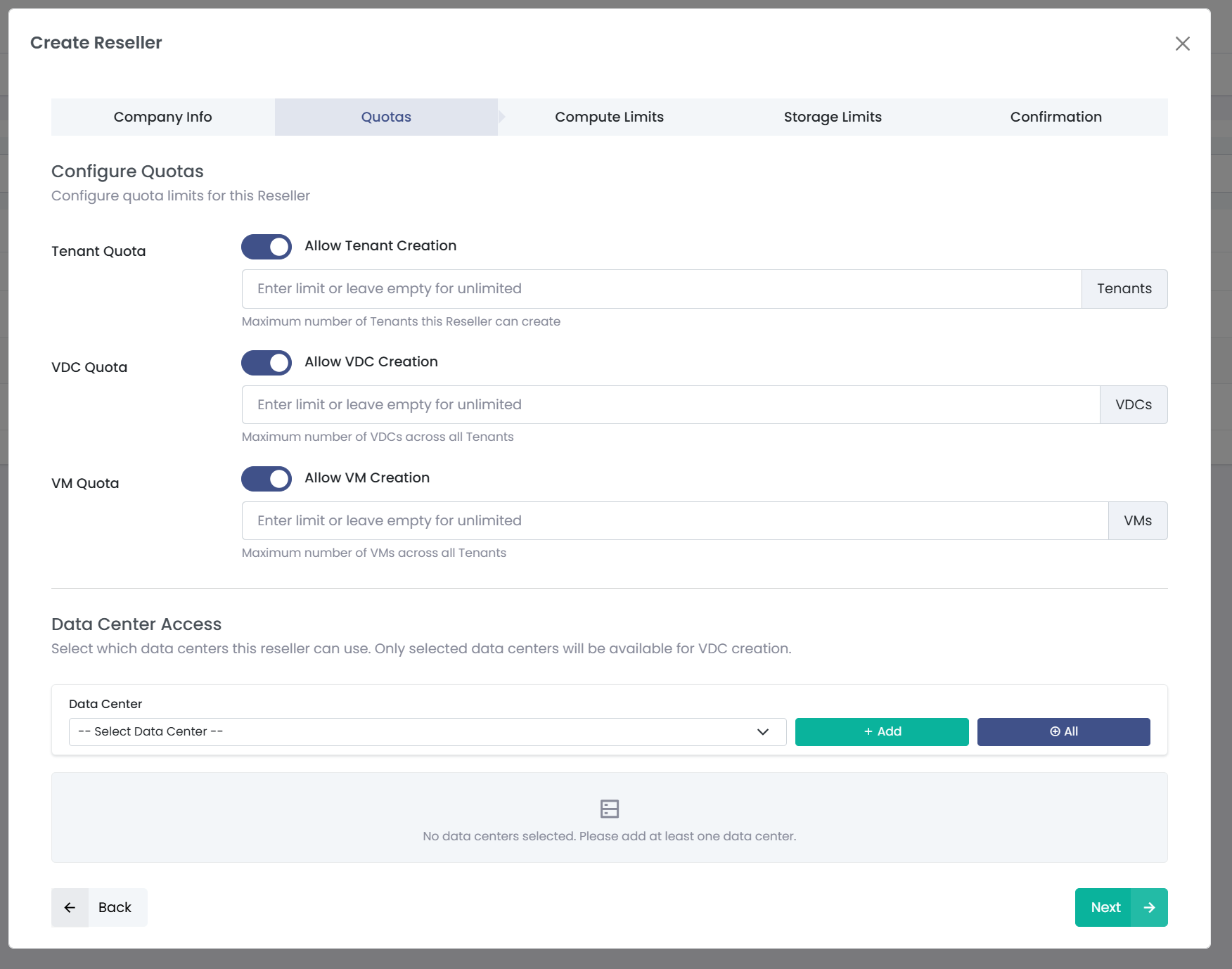
When creating or editing a Reseller, Service Providers can configure the following quotas:
¶ Tenant Quota
- Allow Tenant Creation
- Maximum number of Tenants the Reseller can create
- Leave empty to allow unlimited Tenant creation
¶ VDC Quota
- Allow VDC Creation
- Maximum number of VDCs across all Tenants owned by the Reseller
- Leave empty to allow unlimited VDC creation
¶ VM Quota
- Allow VM Creation
- Maximum number of Virtual Machines (VMs) across all Tenants
- Leave empty to allow unlimited VM creation
These limits are cumulative and shared across the entire Reseller environment.
¶ Data Center Access
Service Providers can specify which data centers a Reseller is permitted to use. Resellers can only deploy resources within the assigned locations.
¶ Compute Limits
Compute limits define how Resellers can create VDCs and how much compute capacity can be consumed across all of their customers.
¶ Creation Policy
The Creation Policy controls the types of VDCs a Reseller is allowed to create:
-
PAYG and Allocation
Allows the creation of both PAYG and Allocation type VDCs. -
Allocation Only
Allows only the creation of Allocation type VDCs.

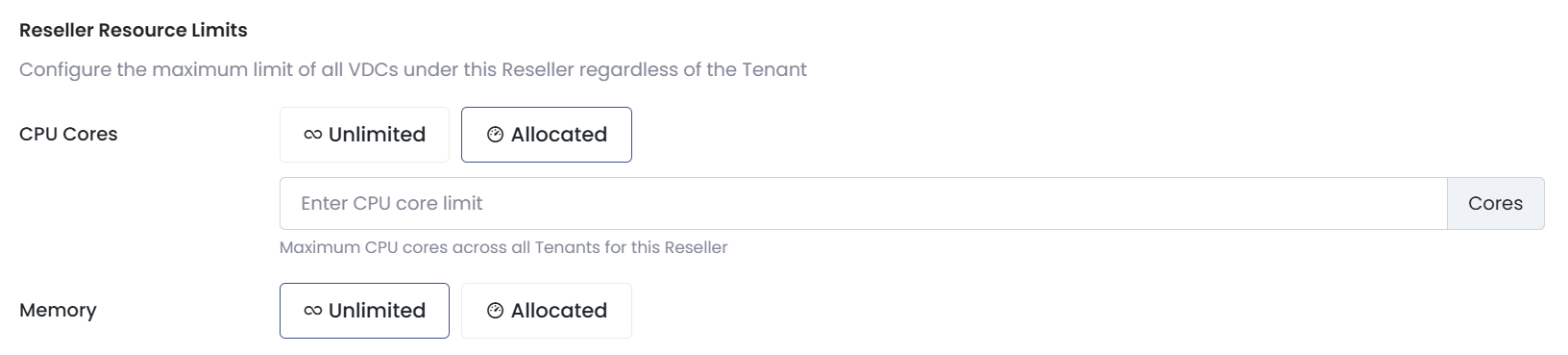
¶ Reseller Resource Limits
Resource limits apply globally across all VDCs and Tenants under the Reseller, regardless of how those resources are distributed.
-
CPU Cores
- Unlimited, or
- Allocated maximum (for example, 100 cores)
- Defines the total number of CPU cores available across all Tenants for this Reseller
-
Memory
- Unlimited, or
- Allocated maximum
- Defines the total amount of memory available across all Tenants for this Reseller
Resellers can divide these resources across their Tenants and VDCs as required, but cannot exceed the total limits defined by the Service Provider.
¶ Storage and Backup Limits
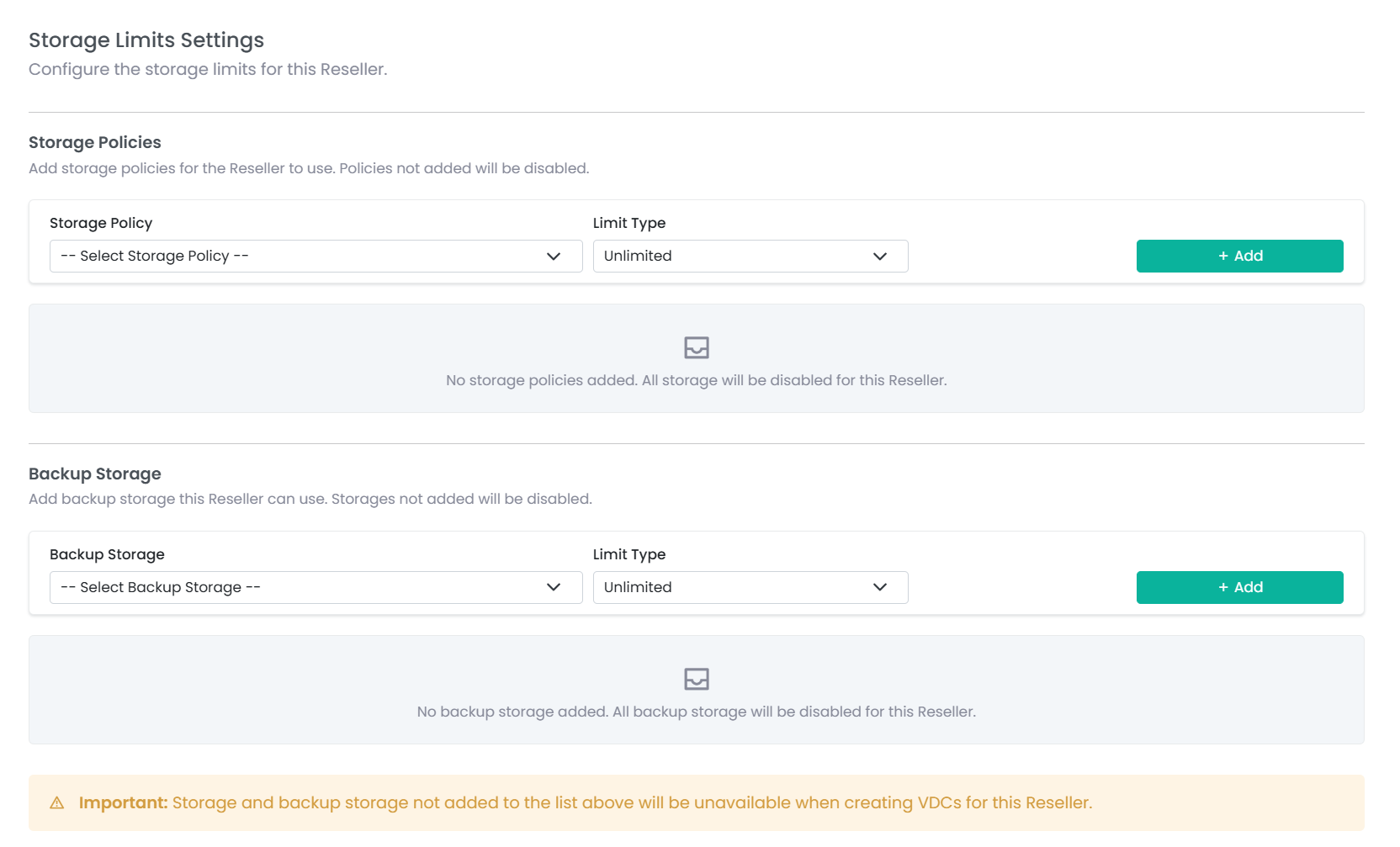
Storage controls define what storage capabilities a Reseller can assign to their customers, and how those resources can be distributed.
¶ Storage Policies
Service Providers assign which storage policies a Reseller can use (for example, Gold, Silver, or other tiers).
Each storage policy can be configured with:
- A fixed quota (for example, 1 TB of Gold storage)
- Unlimited usage (for example, Unlimited Silver storage)
Storage quotas are shared globally across the Reseller, regardless of how they are divided among Tenants or customers.
¶ Backup Limits
Backup quotas are configured independently of storage quotas and can be set as:
- Unlimited
- Fixed quota
This allows flexible combinations, such as unlimited storage with limited backups, or limited storage with unlimited backups.
¶ Usage Visibility
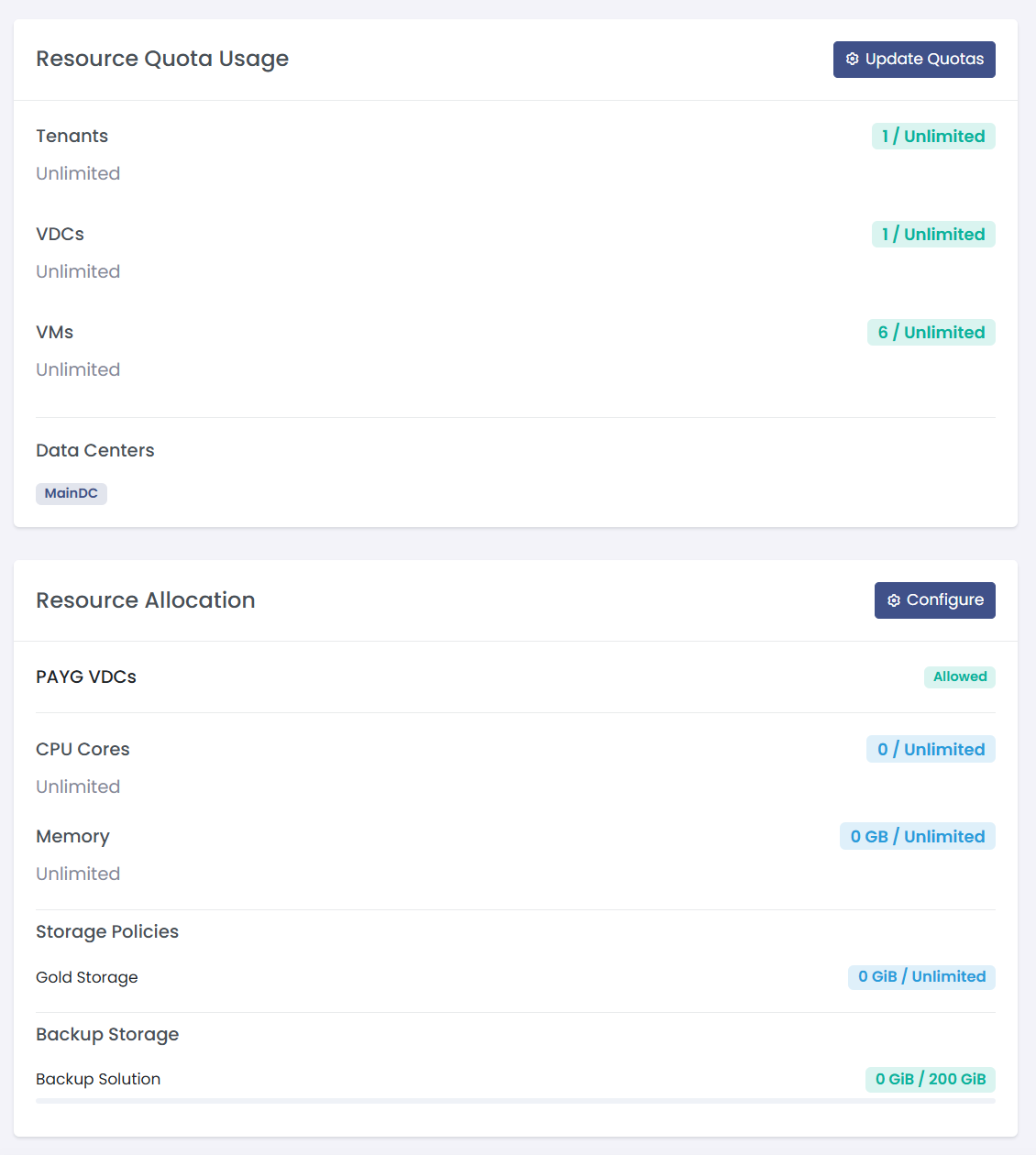
Quota usage is visible in real time to both Service Providers and Resellers.
- Resellers can view their assigned limits, current usage, and remaining capacity
- Service Providers can view the same information when managing or reviewing a Reseller
The dashboard displays:
- Total Tenants created
- Total VDCs created
- Total VMs created
- Remaining capacity for each resource
All usage data is updated in real time, providing immediate feedback as resources are created or removed.
¶ API Endpoints
All endpoints are under /api/v1/reseller/{resellerId} and require Bearer token authentication.
¶ Entity Quotas
| Method | Path | Description |
|---|---|---|
GET |
/reseller/{resellerId}/quota |
Get current quotas, usage statistics, and data center allocations |
PUT |
/reseller/{resellerId}/quota |
Update entity quotas (supports partial updates) |
DELETE |
/reseller/{resellerId}/quota |
Reset all quotas to unlimited and remove all data center allocations |
¶ GET /reseller/{resellerId}/quota
Returns current entity quota usage and data center allocations.
Response:
{
  "status": "success",
  "message": "Entity quotas retrieved successfully",
  "data": {
    "tenants": {
      "current": 3,
      "max": 10,
      "unlimited": false,
      "disabled": false
    },
    "vdcs": {
      "current": 5,
      "max": null,
      "unlimited": true,
      "disabled": false
    },
    "vms": {
      "current": 12,
      "max": 0,
      "unlimited": false,
      "disabled": true
    },
    "data_centers": [
      {
        "data_center_uuid": "dc-uuid-1",
        "data_center_name": "Sydney"
      }
    ]
  }
}
¶ PUT /reseller/{resellerId}/quota
Updates entity quotas. Supports partial updates — only fields included in the request are modified.
Request:
{
  "max_tenants": 10,
  "max_vdcs": null,
  "max_vms": 50,
  "data_centers": [
    "dc-uuid-1",
    { "data_center_uuid": "dc-uuid-2", "remove": true }
  ]
}
Quota values:
| Value | Meaning |
|---|---|
null |
Unlimited (no restriction) |
0 |
Disabled (creation is blocked) |
> 0 |
Limited to that number |
Validation rules:
- New limits cannot be set below current usage
- Data centers accept both simple UUID strings and objects with a
data_center_uuidkey - Use
"remove": trueto remove a data center allocation - Removing a data center is blocked if any VDCs are currently using it
¶ DELETE /reseller/{resellerId}/quota
Resets all entity quotas (max_tenants, max_vdcs, max_vms) to unlimited (null) and removes all data center allocations.
¶ Resource Allocation
| Method | Path | Description |
|---|---|---|
GET |
/reseller/{resellerId}/resource-allocation |
Get CPU, memory, storage, and backup allocation with usage |
PUT |
/reseller/{resellerId}/resource-allocation |
Update resource allocation (supports partial updates) |
DELETE |
/reseller/{resellerId}/resource-allocation |
Delete all resource allocation settings |
¶ GET /reseller/{resellerId}/resource-allocation
Returns full resource allocation details including current usage, available capacity, and usage percentages.
Response:
{
  "status": "success",
  "message": "Resource allocation retrieved successfully",
  "data": {
    "allow_payg": true,
    "cpu": {
      "max": 100,
      "used": 42,
      "available": 58,
      "percentage": 42,
      "unlimited": false
    },
    "memory_gb": {
      "max": 256,
      "used": 64,
      "available": 192,
      "percentage": 25,
      "unlimited": false
    },
    "storage": [
      {
        "storage_policy_uuid": "sp-uuid-1",
        "storage_policy_name": "Gold",
        "max_capacity_gb": 1024,
        "used_capacity_gb": 500,
        "available_capacity_gb": 524,
        "percentage": 48.8,
        "unlimited": false
      }
    ],
    "backup_storage": [
      {
        "backup_storage_uuid": "bs-uuid-1",
        "backup_storage_name": "PBS-01",
        "max_capacity_gb": null,
        "used_capacity_gb": 200,
        "available_capacity_gb": null,
        "percentage": null,
        "unlimited": true
      }
    ]
  }
}
¶ PUT /reseller/{resellerId}/resource-allocation
Updates resource allocation. Supports partial updates — only fields included in the request are modified.
Request:
{
  "allow_payg": false,
  "max_cpu": 200,
  "max_memory_gb": null,
  "storage": [
    { "storage_policy_uuid": "sp-uuid-1", "max_capacity_gb": 2048 },
    { "storage_policy_uuid": "sp-uuid-2", "remove": true }
  ],
  "backup_storage": [
    { "backup_storage_uuid": "bs-uuid-1", "max_capacity_gb": null }
  ]
}
Resource allocation values:
| Value | Meaning |
|---|---|
null |
Unlimited (no restriction) |
> 0 |
Limited to that capacity |
Validation rules:
- Resource limits cannot be set below current usage
- Use
"remove": trueon storage or backup storage items to remove that allocation - Setting
allow_paygtofalserestricts VDC creation to Allocation type only
¶ DELETE /reseller/{resellerId}/resource-allocation
Removes all resource allocation settings (CPU, memory, storage, and backup storage). This operation is blocked if any allocated storage policies or backup storages are currently in use by VDCs. Returns a 422 error with details of which resources are in use.