¶ Table of Contents
- Introduction
- Feature Overview
- Prerequisites and Requirements
- LDAP Configuration
- Import Settings and Role Mapping
- Code-Based Authentication
- User Authentication
- Security Considerations
- Frequently Asked Questions
¶ 1. Introduction
The LDAP (Lightweight Directory Access Protocol) integration for MultiPortal enables centralized user authentication and management through your organization's directory services such as Active Directory or OpenLDAP. This feature streamlines user onboarding, enforces consistent access control, and reduces administrative overhead by synchronizing user credentials and roles from your existing directory infrastructure.
¶ Key Benefits
- Single sign-on experience for users
- Centralized user management through existing directory services
- Automatic role assignment based on LDAP groups
- Enhanced security through encrypted credential storage
- Multi-tier support (Service Provider, Reseller, Tenant)
¶ 2. Feature Overview
¶ 2.1 Supported Directory Types
| Directory Type | Description | Common Use Cases |
|---|---|---|
| Active Directory | Microsoft's directory service for Windows domain networks | Enterprise Windows environments, Office 365 integration |
| OpenLDAP | Open-source LDAP implementation | Linux/Unix environments, mixed OS deployments |
¶ 2.2 Authentication Methods
- Direct LDAP Login: Users authenticate directly using LDAP credentials
- Code-Based Login: Users enter LDAP code + username/password for multi-tenant environments
¶ 2.3 Access Control Hierarchy
LDAP configurations can be created and managed at three levels:
- Service Provider: Can configure LDAP for the entire platform
- Reseller: Can configure LDAP for their own organization and customers
- Tenant Administrator: Can configure LDAP for their specific tenant
Important: Each level can only view and manage their own LDAP configurations. Lower tiers cannot access configurations from higher tiers.
¶ 3. Prerequisites and Requirements
¶ 3.1 System Requirements
- MultiPortal version 1.1.0 or higher
- LDAP encryption keys configured on the server
- Network connectivity to LDAP server(s)
- Appropriate user permissions in MultiPortal
¶ 3.2 LDAP Server Requirements
- LDAP server accessible from MultiPortal server
- LDAP admin account with read access to user directory
- SSL/TLS certificate (recommended for secure connections)
- Properly configured Base DN, User Base DN, and Group Base DN
¶ 3.3 Initial Setup (Server Administrator)
# Generate LDAP encryption key (run once during installation)
./yii generate-ldap-key
Note: The encryption key generation is a one-time setup performed by system administrators. This ensures all LDAP credentials are securely encrypted in the database.
¶ 4. LDAP Configuration
¶ 4.1 Creating LDAP Configuration
¶ Step 1: Navigate to LDAP Configuration
- Log in to MultiPortal as Service Provider, Reseller, or Tenant Administrator
- Navigate to Settings → Authentication → LDAP Configuration
- Click "Create Configuration" button
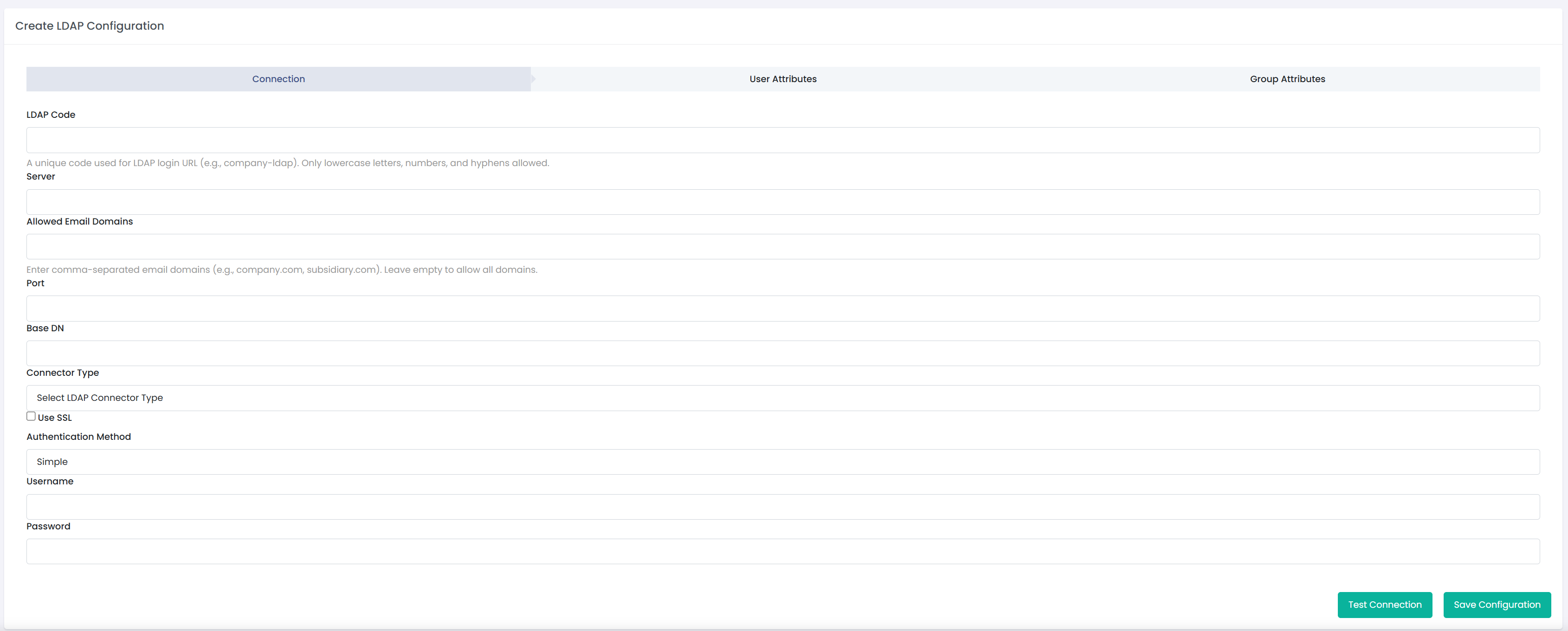
¶ Step 2: Basic Configuration
| Field | Description | Example |
|---|---|---|
| LDAP Code | Unique identifier for multi-tenant login (similar to SAML) | ACME-CORP |
| Domain | Email domain for user authentication | example.com |
| Type | LDAP server type | Active Directory / OpenLDAP |
| Server | LDAP server hostname or IP address | ldap.example.com or 192.168.1.100 |
| Port | LDAP server port (389 for LDAP, 636 for LDAPS) | 389 or 636 |
| Use SSL/TLS | Enable encrypted connection (recommended) | Yes/No |
¶ 4.2 Connection Settings
¶ Base DN Configuration
| Field | Description | Example |
|---|---|---|
| Base DN | Root of directory tree to search | dc=example,dc=com |
| User Base DN | Specific location for user objects | ou=users,dc=example,dc=com |
| Group Base DN | Specific location for group objects | ou=groups,dc=example,dc=com |
¶ Service Account Credentials
Security Note: The service account credentials are securely encrypted and stored. They are used only for reading information from the LDAP directory and do not provide full administrative access.
| Field | Description | Example |
|---|---|---|
| Username | LDAP account with read access to directory | cn=srv-mp-ldap,dc=example,dc=com |
| Password | Password for service account | [encrypted in database] |
¶ Attribute Mapping (Active Directory)
| MultiPortal Field | LDAP Attribute | Description |
|---|---|---|
| Username | sAMAccountName | User's login name |
| User's email address | ||
| First Name | givenName | User's first name |
| Last Name | sn | User's surname |
| Groups | memberOf | User's group memberships |
¶ Attribute Mapping (OpenLDAP)
| MultiPortal Field | LDAP Attribute | Description |
|---|---|---|
| Username | uid | User's login name |
| User's email address | ||
| First Name | givenName | User's first name |
| Last Name | sn | User's surname |
| Groups | memberOf | User's group memberships |
Note: OpenLDAP configurations automatically disable the email field requirement as the username (uid) is used for authentication.
¶ 5. Import Settings and Role Mapping
¶ 5.1 Understanding Role Mapping
Import Settings (previously called "Sync Roles") allows you to map LDAP groups to MultiPortal roles. When a user logs in via LDAP, MultiPortal automatically assigns roles based on their group memberships.
¶ How It Works:
- User authenticates with LDAP credentials
- MultiPortal retrieves user's LDAP group memberships
- System checks Import Settings for matching groups
- Corresponding MultiPortal roles are automatically assigned
- User gains access based on assigned roles
¶ 5.2 Creating Import Settings
¶ Step 1: Access Import Settings
- Navigate to your LDAP configuration view page
- Scroll to "Import Settings" section
- Click "Create Import Setting"
[Insert Screenshot: Import Settings Section]
¶ Step 2: Configure Group-to-Role Mapping
| Field | Description | Example |
|---|---|---|
| LDAP Group | Select group from LDAP directory | CN=Administrators,OU=Groups,DC=example,DC=com |
| MultiPortal Role | Role to assign to group members | Administrator, Support Staff, Sales, etc. |
[Insert Screenshot: Create Import Setting Form]
¶ 5.3 Multiple Group Mappings
You can create multiple import settings to map different LDAP groups to different roles:
| LDAP Group | MultiPortal Role | Purpose |
|---|---|---|
| CN=IT-Admins,OU=Groups,DC=example,DC=com | Administrator | Full system access |
| CN=Support-Team,OU=Groups,DC=example,DC=com | Support Staff | Customer support functions |
| CN=Sales-Team,OU=Groups,DC=example,DC=com | Sales | Sales-related features |
| CN=Billing-Team,OU=Groups,DC=example,DC=com | Billing Manager | Billing and invoicing |
¶ 5.4 Managing Import Settings
¶ Editing Import Settings
- Navigate to LDAP configuration view page
- Find the import setting in the list
- Click "Edit" icon
- Modify group or role mapping
- Click "Save"
¶ Deleting Import Settings
- Navigate to LDAP configuration view page
- Find the import setting in the list
- Click "Delete" icon
- Confirm deletion
Important: If a user belongs to multiple LDAP groups with different role mappings, the system uses the first matching group found in the import settings.
¶ 6. Code-Based Authentication
¶ 6.1 LDAP Code Feature
The LDAP Code feature enables multi-tenant environments where multiple organizations use LDAP authentication. This is similar to the SAML code implementation and allows users to specify which LDAP configuration to use during login.
¶ 6.2 Configuring LDAP Code
When creating or editing an LDAP configuration, specify a unique LDAP Code:
- Format: Alphanumeric, uppercase recommended
- Example: ACME-CORP, RESELLER-001, TENANT-XYZ
- Uniqueness: Must be unique across all LDAP configurations
¶ 6.3 User Login Process
¶ Standard Login Page
- User navigates to MultiPortal login page
- Clicks "Login with LDAP" button
- Redirected to LDAP login form
[Insert Screenshot: Main Login Page with "Login with LDAP" Button]
¶ LDAP Login Form
User enters the following credentials:
| Field | Description | Example |
|---|---|---|
| LDAP Code | Organization's LDAP identifier | ACME-CORP |
| Username | LDAP username or email | jdoe@example.com or jdoe |
| Password | LDAP password | [user's LDAP password] |
[Insert Screenshot: LDAP Login Form]
¶ 6.4 Authentication Flow
- User submits LDAP code, username, and password
- MultiPortal validates LDAP code and retrieves configuration
- System connects to specified LDAP server
- User credentials are authenticated against LDAP
- Upon success, user's groups are retrieved
- Import settings are applied to assign roles
- User session is created with appropriate permissions
- User is redirected to dashboard
¶ 7. User Authentication
¶ 7.1 Authentication Methods
¶ Email-Based Authentication
Users can log in using their full email address:
- Format: username@domain.com
- Example: john.doe@example.com
- Domain Validation: Email domain must match LDAP configuration domain
¶ Username-Based Authentication
For OpenLDAP configurations, users can authenticate with username only:
- Format: username
- Example: jdoe
- Availability: OpenLDAP configurations only
¶ 7.2 First-Time Login
When a user logs in via LDAP for the first time:
- System authenticates against LDAP server
- Retrieves user information (name, email, groups)
- Creates MultiPortal user account automatically
- Assigns roles based on import settings
- Associates user with correct company (Service Provider, Reseller, or Tenant)
- Grants access based on assigned roles
Automatic User Creation: No manual user creation required. Users are automatically provisioned upon first successful LDAP login.
¶ 7.3 Subsequent Logins
For returning users:
- System authenticates against LDAP server
- Retrieves current group memberships
- Updates roles if group memberships have changed
- Creates session with current permissions
¶ 7.4 Login Validation Messages
Common Login Errors:
- "Invalid LDAP code" - LDAP code not found or incorrect
- "Invalid username or password" - Authentication failed
- "Domain not allowed" - Email domain doesn't match configuration
- "User not in allowed groups" - No matching import settings for user's groups
- "Account disabled" - LDAP account is disabled
- "Connection failed" - Cannot connect to LDAP server
¶ 8. Security Considerations
¶ 8.1 Credential Security
¶ Encryption at Rest
- All LDAP admin passwords are encrypted using AES-256 encryption
- Encryption keys are stored securely on the server
- Keys are generated during initial setup using
./yii generate-ldap-key - Database stores only encrypted values, never plaintext passwords
¶ Encryption in Transit
- SSL/TLS recommended for all LDAP connections
- Use LDAPS (port 636) instead of LDAP (port 389) when possible
- Verify certificate validity for production environments
¶ 8.2 Access Control
¶ Configuration Access
| User Level | Can View | Can Create | Can Edit | Can Delete |
|---|---|---|---|---|
| Service Provider Admin | Own configs only | Yes | Yes | Yes |
| Reseller Admin | Own configs only | Yes | Yes | Yes |
| Tenant Admin | Own configs only | Yes | Yes | Yes |
¶ Permission Requirements
- Users must have appropriate permissions to access LDAP configuration pages
- Unauthenticated users are automatically redirected to login
- 403 Forbidden error displayed if user lacks required permissions
¶ 8.3 Best Practices
¶ LDAP Admin Account
- Use dedicated service account with minimal permissions
- Grant only read access to directory
- Avoid using domain administrator accounts
- Regularly rotate credentials
- Monitor account usage for suspicious activity
¶ Configuration Security
- Always enable SSL/TLS for production environments
- Use strong, unique LDAP codes
- Regularly review and audit import settings
- Document all LDAP configurations and mappings
- Test changes in non-production environment first
¶ User Security
- Enforce strong password policies in LDAP directory
- Implement account lockout policies
- Regularly review user group memberships
- Disable accounts promptly when users leave organization
- Use multi-factor authentication at LDAP level when possible
¶ 8.4 Compliance Considerations
- LDAP integration supports compliance with centralized identity management requirements
- Encryption ensures sensitive credentials meet data protection standards
- Automatic user provisioning reduces risk of orphaned accounts
- Role-based access control aligns with principle of least privilege
¶ 9. Frequently Asked Questions
¶ General Questions
¶ Q: Can I use both LDAP and local MultiPortal authentication?
A: Yes. LDAP authentication is an additional option. Users can still authenticate using local MultiPortal credentials. The authentication flow checks LDAP first (if configured), then falls back to local authentication if needed.
¶ Q: What happens if LDAP server is unavailable?
A: Users will receive a connection error message. Local MultiPortal accounts will still function normally. LDAP users will need to wait until server connectivity is restored.
¶ Q: Can multiple companies use the same LDAP server?
A: Yes. Each company (Service Provider, Reseller, or Tenant) can configure their own LDAP connection, even to the same server. Use different Base DNs or LDAP codes to differentiate.
¶ Q: Do I need to manually create users before they can login via LDAP?
A: No. Users are automatically created in MultiPortal upon first successful LDAP login. Import settings determine their initial roles.
¶ Configuration Questions
¶ Q: What's the difference between Active Directory and OpenLDAP types?
A: The main differences are attribute mappings and authentication methods:
- Active Directory uses sAMAccountName for username
- OpenLDAP uses uid for username
- OpenLDAP allows username-only login (without email)
- Attribute names differ slightly between the two
¶ Q: Why is SSL/TLS recommended?
A: SSL/TLS encrypts all communication between MultiPortal and the LDAP server, including user credentials during authentication. This prevents credential interception and ensures secure data transmission.
¶ Q: Can I have multiple LDAP configurations for the same domain?
A: Yes, but each must have a unique LDAP code. Users will need to specify which configuration to use via the code-based login.
¶ Q: What happens if I delete an LDAP configuration?
A: The configuration and all associated import settings are deleted. Existing users created via that LDAP configuration remain in the system but can no longer authenticate via LDAP. They would need local MultiPortal credentials or be associated with a different LDAP configuration.
¶ Authentication Questions
¶ Q: Can users change their password in MultiPortal?
A: No. LDAP users must change their passwords through your organization's directory service (Active Directory, OpenLDAP, etc.). MultiPortal does not modify LDAP directory data.
¶ Q: What if a user belongs to multiple LDAP groups with different role mappings?
A: The system uses the first matching group found in your import settings. Order your import settings carefully to ensure correct role assignment.
¶ Q: How often are user roles synchronized from LDAP?
A: Roles are synchronized during each login. If a user's group memberships change in LDAP, they need to log out and log back in for role changes to take effect.
¶ Q: Can I restrict LDAP login to specific IP addresses?
A: IP-based restrictions would need to be configured at the LDAP server level or through firewall rules. MultiPortal itself does not provide IP-based LDAP access control.
¶ Troubleshooting Questions
¶ Q: Why am I getting "No matching import settings" error?
A: This means the user successfully authenticated to LDAP, but none of their LDAP group memberships match any configured import settings. Solution:
- Check user's LDAP group memberships in your directory
- Create import settings for at least one of those groups
- Or add user to appropriate groups in LDAP directory
¶ Q: Users cannot login after LDAP configuration. Why?
A: User login failures could be due to:
- Incorrect username/password
- User not in allowed groups (no matching import settings)
- Domain mismatch
- User account disabled in LDAP
- LDAP server connection issues
Contact your administrator to verify configuration and user details.
¶ Q: How do I troubleshoot "Domain not allowed" errors?
A: This error occurs when the email domain in the username doesn't match the configured domain. Solutions:
- Ensure user enters full email address (user@domain.com)
- Verify domain field in LDAP configuration matches user's email domain
- For OpenLDAP, users can login with username only (no email required)
¶ Integration Questions
¶ Q: Can LDAP work alongside SAML or SSO?
A: Yes. MultiPortal supports multiple authentication methods simultaneously. Users can choose their preferred method (local, LDAP, SAML, or SSO) from the login page.
¶ Q: Does LDAP integration sync user profile information?
A: Yes. During login, MultiPortal retrieves and updates:
- First name
- Last name
- Email address
- Group memberships (for role assignment)
¶ Q: Can I use LDAP with MultiPortal API?
A: LDAP is primarily designed for web interface login. API authentication typically uses API keys or tokens. Check API documentation for available authentication methods.
¶ Advanced Questions
¶ Q: How do I migrate from local accounts to LDAP authentication?
A:
- Configure LDAP with appropriate import settings
- Test authentication with a few pilot users
- Existing local accounts with matching email addresses will be linked to LDAP users automatically
- Users can continue using local credentials or switch to LDAP
- Gradually migrate users by communicating the change
- Optionally disable local account passwords once LDAP is fully adopted
¶ Q: Can I customize attribute mappings?
A: The current implementation uses standard attribute mappings for Active Directory and OpenLDAP. Custom attribute mapping would require code modifications. Contact support if you have specific requirements.
¶ Q: Is nested group support available?
A: The current implementation reads direct group memberships. Nested group support (groups within groups) may be added in future releases based on customer demand.
¶ Q: Can I automate LDAP configuration via API or scripts?
A: Direct API endpoints for LDAP configuration are not currently exposed. Configuration must be done through the web interface. Contact development team if you have automation requirements.