¶ Table of Contents
- Overview
- Before You Begin
- Creating a New SAML Configuration
- Updating Existing Configuration
- Configuration Tabs Explained
- Import Metadata Methods
- Testing Your Configuration
- Common Configurations by IdP
- Troubleshooting
- Best Practices
¶ Overview
This guide walks you through creating and updating SAML configurations for individual tenants in your multi-tenant application. Each tenant can have their own Identity Provider (IdP) configuration, allowing for flexible SSO implementations.
¶ Before You Begin
¶ Required Information from Your IdP:
- Entity ID - Unique identifier for the IdP
- SSO URL - Where to send authentication requests
- X.509 Certificate - For signature validation
- Metadata URL or Metadata XML (optional but recommended)
¶ Required Permissions:
- Super Admin or Admin role
- Access to tenant management
¶ Your SP Information to Share with IdP:
Entity ID: https://yourdomain.com
ACS URL: https://yourdomain.com/saml/acs
SLS URL: https://yourdomain.com/saml/sls
Metadata URL: https://yourdomain.com/saml/metadata/{tenant-id}
¶ Creating a New SAML Configuration
¶ Step 1: Navigate to SAML Configurations
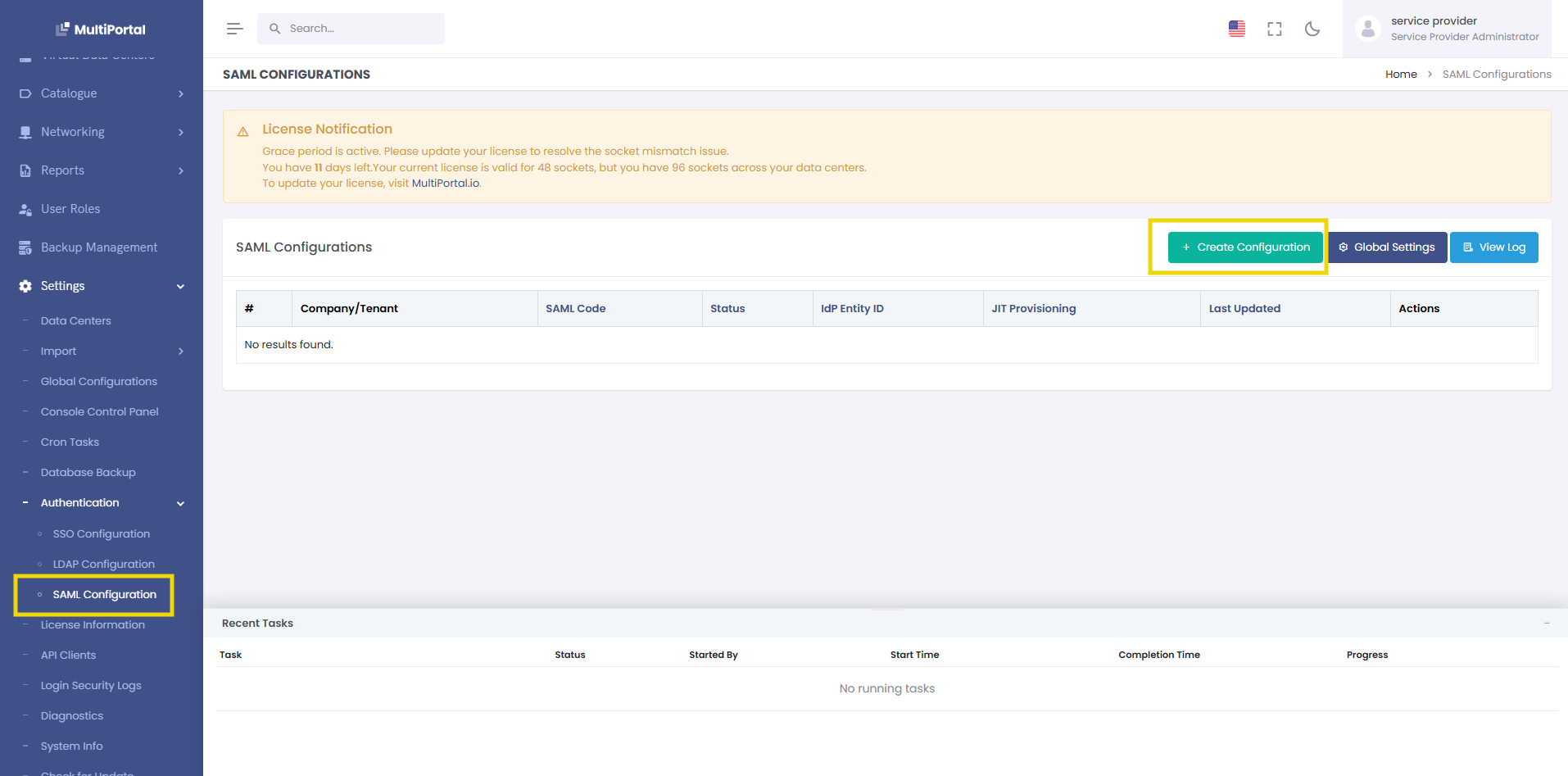
- Go to Settings → SAML Configurations
- Click the Create New button
¶ Step 2: Select Company
- Choose the tenant from the dropdown
- This cannot be changed after creation
.png)
¶ Step 3: Import IdP Metadata (Recommended)
Click the Import Metadata button in the top-right corner:
.png)
You have three options:
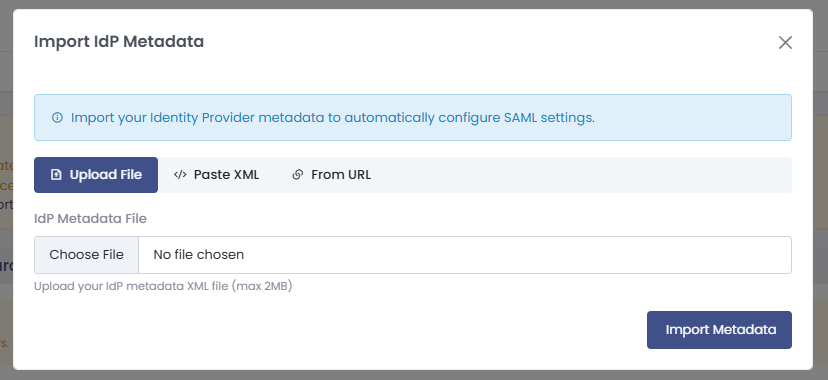
¶ Option A: Upload File
Best for: When you have downloaded metadata XML from your IdP
<!-- Example: onelogin_metadata.xml -->
<?xml version="1.0"?>
<EntityDescriptor xmlns="urn:oasis:names:tc:SAML:2.0:metadata"...>
  <!-- Metadata content -->
</EntityDescriptor>
¶ Option B: Paste XML
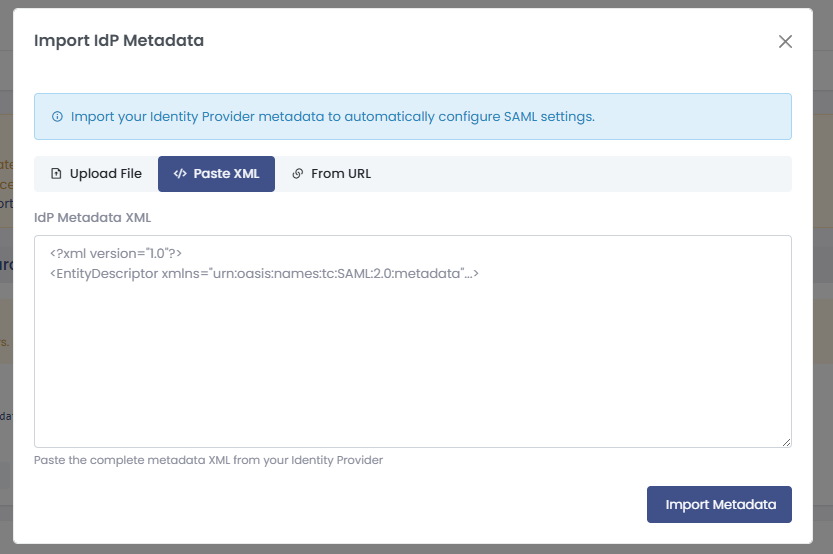
Best for: When you have metadata XML in text format
- Copy the entire XML content
- Paste into the text area
- Click Import
¶ Option C: From URL
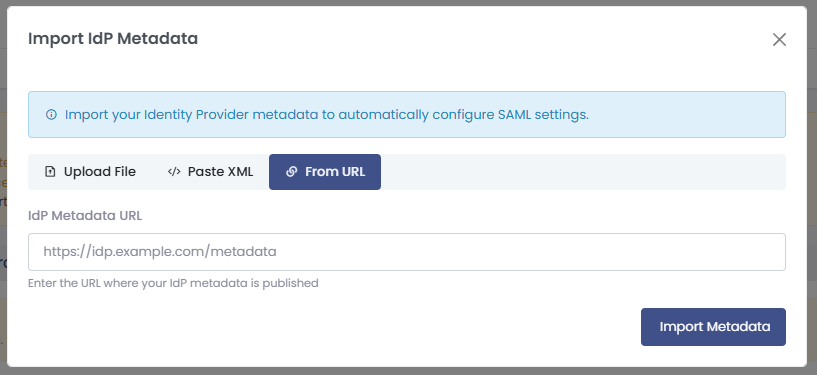
Best for: IdPs that publish metadata at a URL
https://idp.example.com/metadata
https://yourcompany.okta.com/app/appid/sso/saml/metadata
https://login.microsoftonline.com/tenant-id/federationmetadata/2007-06/federationmetadata.xml
¶ Step 4: Configure Basic Settings
After import (or if configuring manually), you'll see populated fields:
¶ Step 5: Set SAML Code
A unique identifier for SAML configuration. Used in login URLs like /saml/login?code=company-name. If left empty, it will be generated from the company name.
.png)
¶ Configuration Tabs Explained
¶ 1. Basic Configuration Tab
¶ Enable/Disable Toggle
- Enabled : Users can log in using SAML
- Disabled : SAML login is disabled (useful for testing)
¶ Identity Provider Settings
| Field | Description | Example | Required |
|---|---|---|---|
| IdP Entity ID | Unique identifier for the IdP | https://idp.company.com |
Yes |
| IdP SSO URL | Where to redirect users for login | https://idp.company.com/sso |
Yes |
| IdP SLS URL | Single Logout Service URL | https://idp.company.com/slo |
No |
| IdP X.509 Certificate | Public certificate for signature validation | -----BEGIN CERTIFICATE-----... |
Yes |
Tips:
- Entity ID must match exactly what's configured in IdP
- SSO URL should use HTTPS
- Certificate should include BEGIN/END markers
.png)
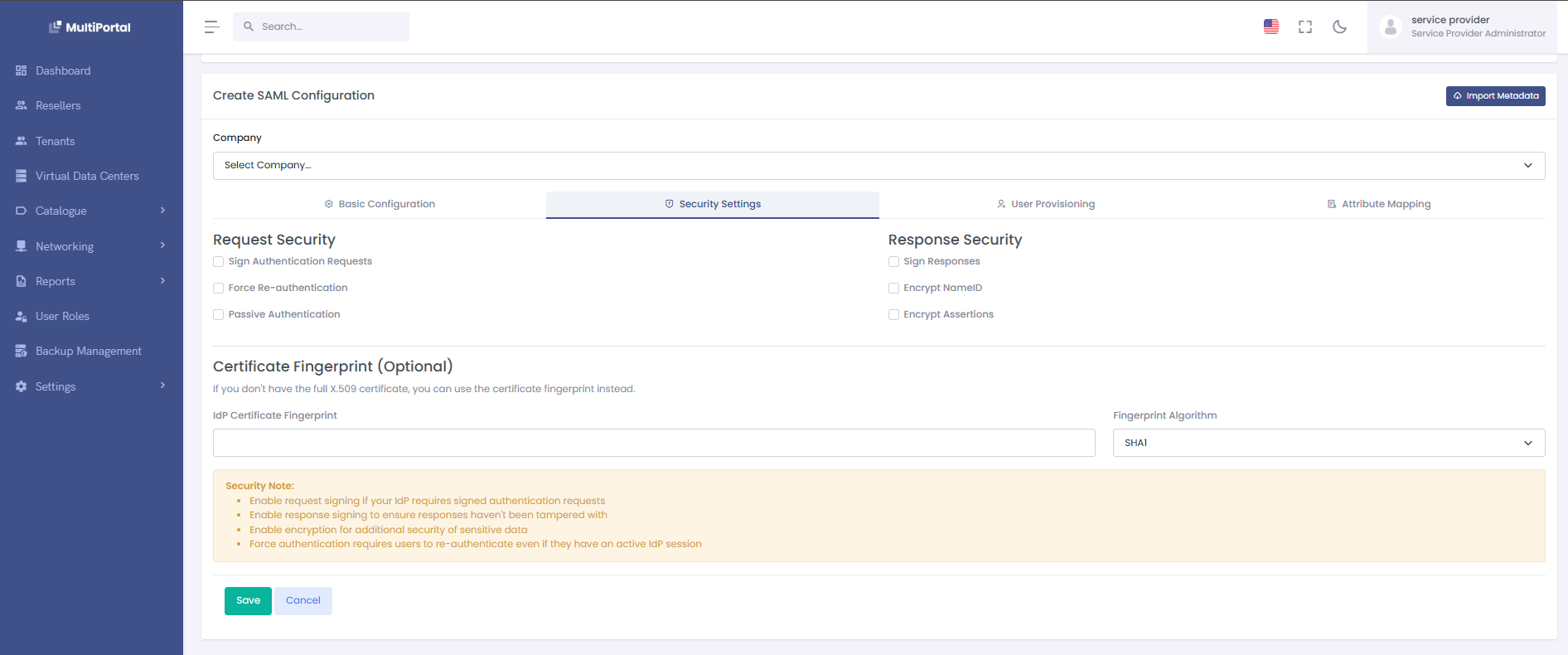
¶ 2️. Security Settings Tab
¶ Request Security
| Setting | Description | Default | When to Change |
|---|---|---|---|
| Force Re-authentication | Force users to re-enter credentials | Off | High-security apps |
| Passive Authentication | Don't force login if no session | Off | Embedded apps |
| Sign Authentication Requests | Digitally sign outgoing requests | On | Keep enabled |
| Sign Responses | Sign logout responses | On | Keep enabled |
¶ Response Security
| Setting | Description | Default | Recommendation |
|---|---|---|---|
| Encrypt NameID | Encrypt user identifier | Off | Enable for sensitive data |
| Encrypt Assertions | Encrypt entire SAML assertion | Off | Enable for high security |
¶ NameID Format
Select how the IdP should identify users:
- Email Address (Recommended):
user@company.com - Persistent: Opaque identifier
- Transient: Temporary identifier
- Unspecified: Let IdP decide
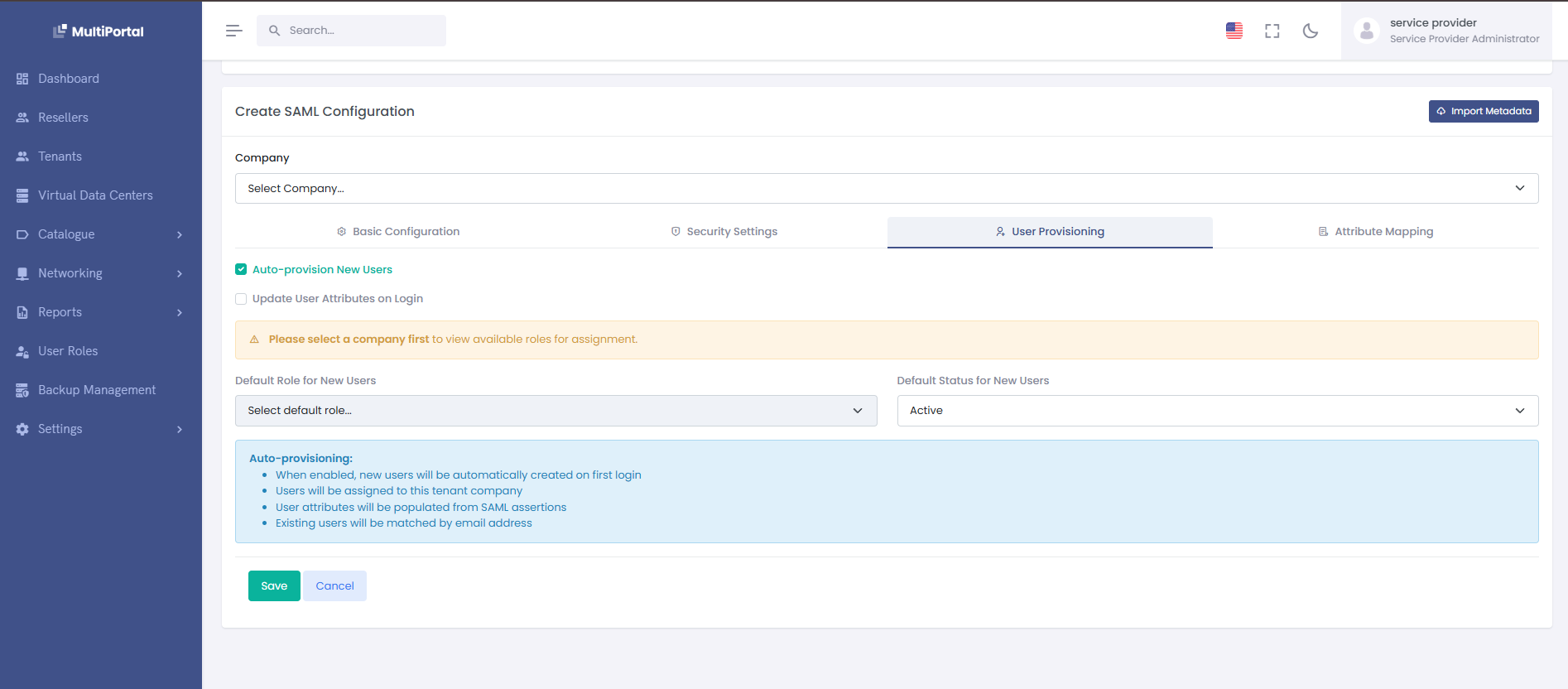
¶ 3. User Provisioning Tab
Controls how users are created and updated during SAML login.
¶ Auto-provision Settings
Enable Auto-provisioning
- On: Automatically create users on first login
- Off: Only existing users can log in
Update User Attributes
- On: Update user info on each login
- Off: Only update on first login
¶ Default Settings for New Users
| Setting | Description | Options | Example |
|---|---|---|---|
| Default Role | Role assigned to new users | Dropdown of available roles | "Tenant User" |
| Default Status | Initial user status | Active/Inactive | "Active" |
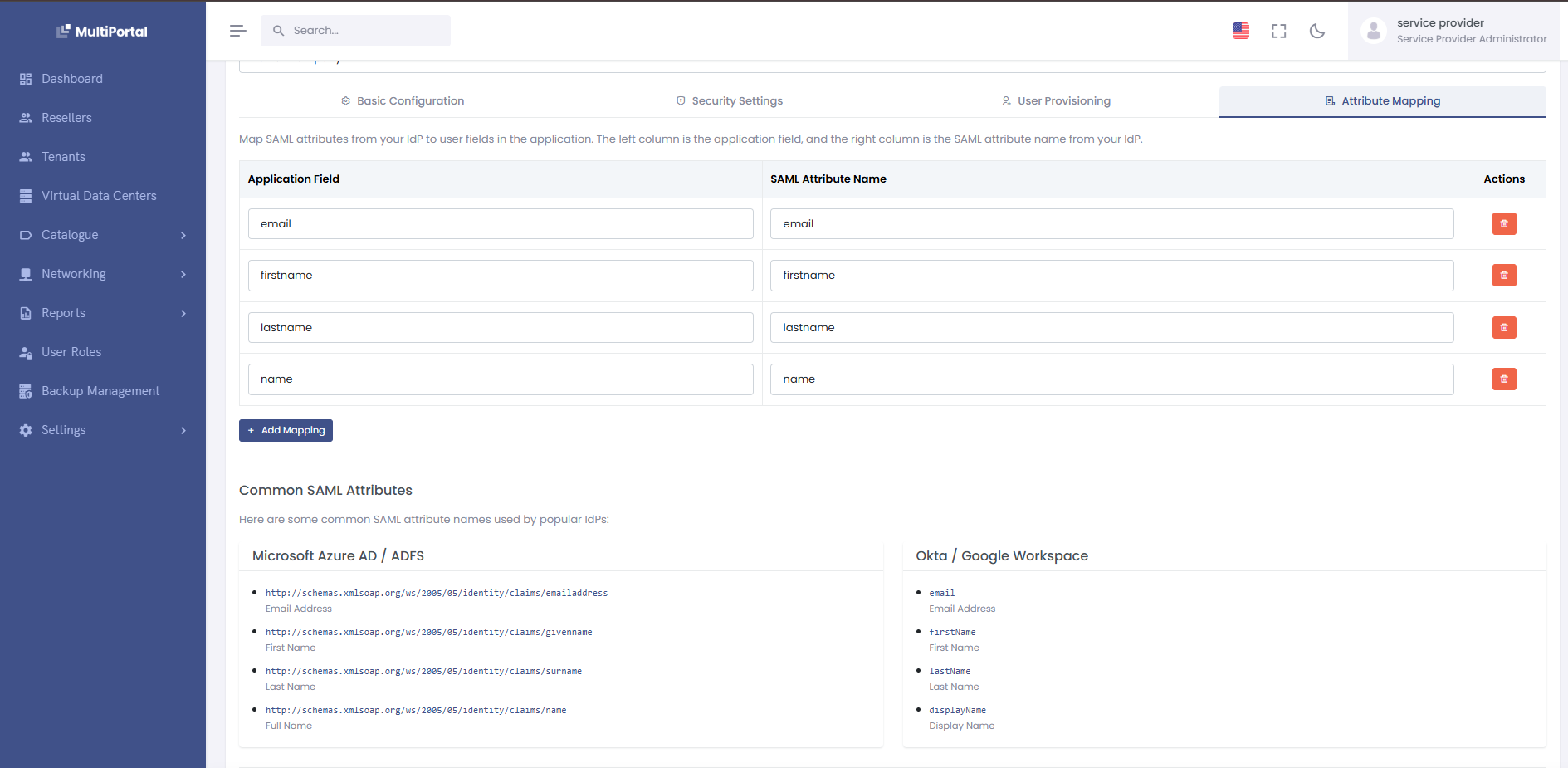
¶ 4. Attribute Mapping Tab
Maps SAML attributes to user fields in your system.
¶ Standard Mappings
| System Field | Common SAML Attributes | Purpose |
|---|---|---|
email, mail, emailAddress |
User's login email | |
| firstname | firstName, givenName, fname |
First name |
| lastname | lastName, surname, sn |
Last name |
| name | displayName, fullName |
Full display name |
¶ Adding Custom Mappings
- Click Add Mapping
- Enter system field name
- Enter SAML attribute name
- Click ✓ to save
Example Custom Mappings:
department → Department
manager → ManagerEmail
employeeId → EmployeeNumber
phoneNumber → telephoneNumber
¶ 
¶ Import Metadata Methods
¶ Method 1: File Upload (Recommended)
-
Download metadata from your IdP:
- Okta: Admin → Applications → Your App → Sign On → Metadata URL
- OneLogin: Applications → Your App → More Actions → SAML Metadata
- Azure AD: Enterprise Apps → Your App → Single sign-on → Download metadata
-
Import the file:
1. Click "Import Metadata" 2. Select "Upload File" tab 3. Choose your .xml file 4. Click "Import" -
Verify imported data:
- Check Entity ID matches
- Verify SSO URL is correct
- Confirm certificate was imported
¶ Method 2: Paste XML
Perfect when you have the XML content but not as a file:
<!-- Copy this entire block from your IdP -->
<?xml version="1.0"?>
<EntityDescriptor xmlns="urn:oasis:names:tc:SAML:2.0:metadata"
                  entityID="https://idp.example.com">
  <IDPSSODescriptor>
    <KeyDescriptor use="signing">
      <KeyInfo>
        <X509Data>
          <X509Certificate>MIIDpDCCA...</X509Certificate>
        </X509Data>
      </KeyInfo>
    </KeyDescriptor>
    <SingleSignOnService
      Binding="urn:oasis:names:tc:SAML:2.0:bindings:HTTP-Redirect"
      Location="https://idp.example.com/sso"/>
  </IDPSSODescriptor>
</EntityDescriptor>
¶ Method 3: From URL
Some IdPs publish metadata at a URL:
Common Metadata URLs:
# Okta
https://{yourOktaDomain}/app/{appId}/sso/saml/metadata

# Azure AD
https://login.microsoftonline.com/{tenant-id}/federationmetadata/2007-06/federationmetadata.xml

# ADFS
https://{adfs-server}/FederationMetadata/2007-06/FederationMetadata.xml

# Google Workspace
https://accounts.google.com/o/saml2/metadata?idpid={idp-id}
¶ Testing Your Configuration
¶ 1. Save Configuration First
Click Save to store your configuration
¶ 2. Test Login Flow
¶ Option A: SP-Initiated Login
- Navigate to:
https://yourdomain.com/saml/login/{tenant-id} - You should be redirected to IdP login page
- Enter credentials
- Should return to your app logged in
¶ Option B: Test from Configuration Page
- On the view page, click Test Configuration
- Opens in new window
- Complete login
- Check for success or error messages
¶ 3. Verify User Creation (if auto-provisioning enabled)
- Check Users list for new user
- Verify attributes mapped correctly
- Confirm role assignment
¶ 4. Test Logout (if configured)
- Click Logout in your app
- Should redirect to IdP logout
- Confirm session ended in both systems
¶ Common Configurations by IdP
¶ Okta Configuration
-
In Okta Admin:
Applications → Create App Integration → SAML 2.0 Single Sign-On URL: https://yourdomain.com/saml/acs Audience URI: https://yourdomain.com Default RelayState: (leave blank) Name ID format: EmailAddress Application username: Email -
Attribute Statements:
email → user.email firstName → user.firstName lastName → user.lastName -
In Your App:
- Import metadata from Okta
- Enable auto-provisioning
- Set default role
¶ Azure AD Configuration
-
In Azure Portal:
Enterprise Applications → New Application → Non-gallery Identifier: https://yourdomain.com Reply URL: https://yourdomain.com/saml/acs Sign-on URL: https://yourdomain.com/saml/login/{tenant-id} -
User Attributes:
email → user.mail firstName → user.givenname lastName → user.surname name → user.displayname -
Import to Your App:
- Download Federation Metadata XML
- Import via file upload
- Map attributes accordingly
¶ Google Workspace Configuration
-
In Google Admin:
Apps → Web and mobile apps → Add custom SAML app ACS URL: https://yourdomain.com/saml/acs Entity ID: https://yourdomain.com Start URL: https://yourdomain.com/saml/login/{tenant-id} -
Attribute Mapping:
Primary Email → email
First Name   → firstName
Last Name    → lastName
¶ OneLogin Configuration
-
In OneLogin Admin:
Applications → Add App → SAML Custom Connector (Advanced) Audience: https://yourdomain.com Recipient: https://yourdomain.com/saml/acs ACS URL: https://yourdomain.com/saml/acs -
Parameters:
Email      → Email (SAML NameID)
FirstName  → First Name
LastName   → Last Name
¶ Updating Existing Configuration
¶ When to Update
-
IdP Certificate Rotation
- IdPs rotate certificates periodically
- You'll get signature validation errors
- Re-import metadata or update certificate
-
URL Changes
- IdP migrated to new domain
- Update SSO/SLS URLs
-
Attribute Changes
- New attributes available
- Attribute names changed
- Update mapping accordingly
¶ Update Process
-
Navigate to Configuration:
- Settings → SAML Configurations
- Click on tenant name
-
Click Edit/Update:
- Make necessary changes
- Use Import Metadata for bulk updates
-
Test Before Saving:
- Verify in test environment first
- Test with a few users
- Roll out to all users
¶ Safe Update Practices
¶ Before Major Updates:
-
Document Current Settings
- Screenshot all tabs
- Export current certificate
- Note working attribute mappings
-
Communicate Changes
- Notify users of maintenance
- Provide fallback login method
- Set maintenance window
-
Have Rollback Plan
- Keep old certificate
- Document previous URLs
- Test rollback procedure
¶ Troubleshooting
¶ Common Issues and Solutions
¶ 1. "Invalid SAML Response"
Symptoms: Error after IdP login
Check:
- Certificate mismatch (re-import metadata)
- Clock skew (sync server time)
- Entity ID mismatch
¶ 2. "User not found" after successful auth
Symptoms: SAML validates but user can't access
Solutions:
- Enable auto-provisioning
- Check email attribute mapping
- Verify NameID format
¶ 3. "Signature validation failed"
Symptoms: Security error
Solutions:
- Update IdP certificate
- Check signature algorithm
- Verify certificate format
¶ 4. Attributes not updating
Symptoms: User info stays old
Check:
- "Update User Attributes" is enabled
- Attribute names match exactly
- Check SAML response in logs
¶ Debug Checklist
-
Check SAML Logs:
Settings → Logs → SAML Authentication -
Validate Metadata:
- Use online SAML validators
- Check XML syntax
- Verify certificate chain
-
Test with SAML Tracer:
- Browser extension
- Captures SAML flow
- Shows actual values
¶ Command Line Tools (DEBUG)
# Generate new certificate
php yii saml/generate-certificate

# Validate metadata
php yii saml/validate-metadata {tenant-id}

# Clear SAML cache
php yii cache/flush saml