As of 1.0.9 MultiPortal now includes some support for Cloud-Init templates on Proxmox, enabling service providers to streamline initial VM setup with simple customization options.
This is an early version of Cloud-Init support. At this stage, only basic fields (Username, Password, and SSH Private Key) are available. Advanced YAML scripting is not yet supported, but is coming soon!
¶ What is Cloud-Init?
Cloud-Init is a widely-used tool that helps automate early initialization of cloud instances.
In Proxmox, this allows you to create VM templates that can be configured dynamically at launch time with things like:
- User credentials
- SSH keys
- Custom scripts (coming soon in MultiPortal)
¶ Getting Started with Cloud-Init in MultiPortal
To use Cloud-Init with MultiPortal, follow these steps:
¶ 1. Create a Cloud-Init Enabled Template
You’ll first need a template on your Proxmox host with Cloud-Init enabled.
Refer to the official Proxmox documentation for guidance:
🔗 Proxmox Cloud-Init Support
Make sure your VM template has:
- The
cloud-initdrive added - An appropriate image (e.g. Ubuntu Cloud image)
- Been converted to a template
¶ 2. Import Your new Template to MultiPortal
To make your Cloud-Init enabled template available in MultiPortal:
-
Click on Settings → Import → Templates
-
Select your Data Center
-
Select the new Template
-
Choose to make it Public by checking "Is Public"
or
Select the Tenant and Virtual Data Center to assign the template to -
Click Import VM Templates
The template will be imorted into MultiPortal.
¶ 3. Using Cloud-Init in MultiPortal
If a template includes a Cloud-Init drive, MultiPortal will automatically display Cloud-Init fields when creating a new Virtual Machine from that template.
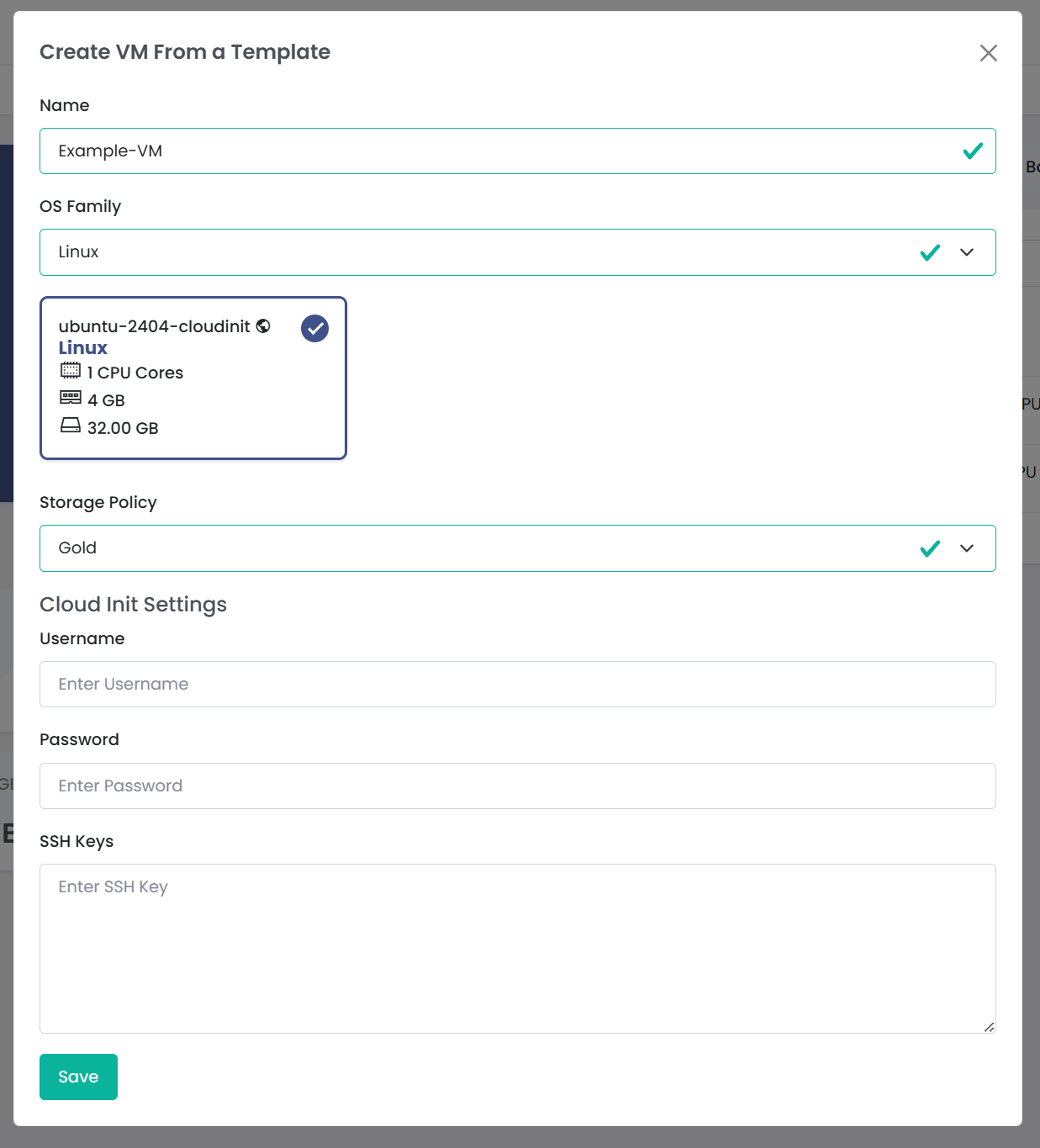
To launch a new VM using Cloud-Init:
- From within a Virtual Data Center (VDC), click "New Virtual Machine" → "From Template"
- Select the template that includes a Cloud-Init drive
- Fill out the available Cloud-Init fields (e.g. Username, Password, SSH Public Key)
- Click Save to create the VM
¶ What's Coming Soon?
In future updates, you’ll be able to:
- Utilise full YAML-based Cloud-Init scripts
- Chain script snippets or select from reusable libraries
¶ Feedback Welcome
Since this is an early version, we’re keen to hear your feedback. If you encounter any issues or have suggestions, please reach out to us on Discord, Reddit or send us an email to support@multiportal.io